Updated October 2026
 In short
- Google says local results are based mainly on relevance, distance and prominence, and that nobody can pay for a better local ranking.
- Relevance comes from the right primary category and a complete, accurate profile. Prominence comes from reviews, links and your reputation across the web.
- Keyword-stuffed business names, fake addresses and bought reviews put your profile at risk of suspension.
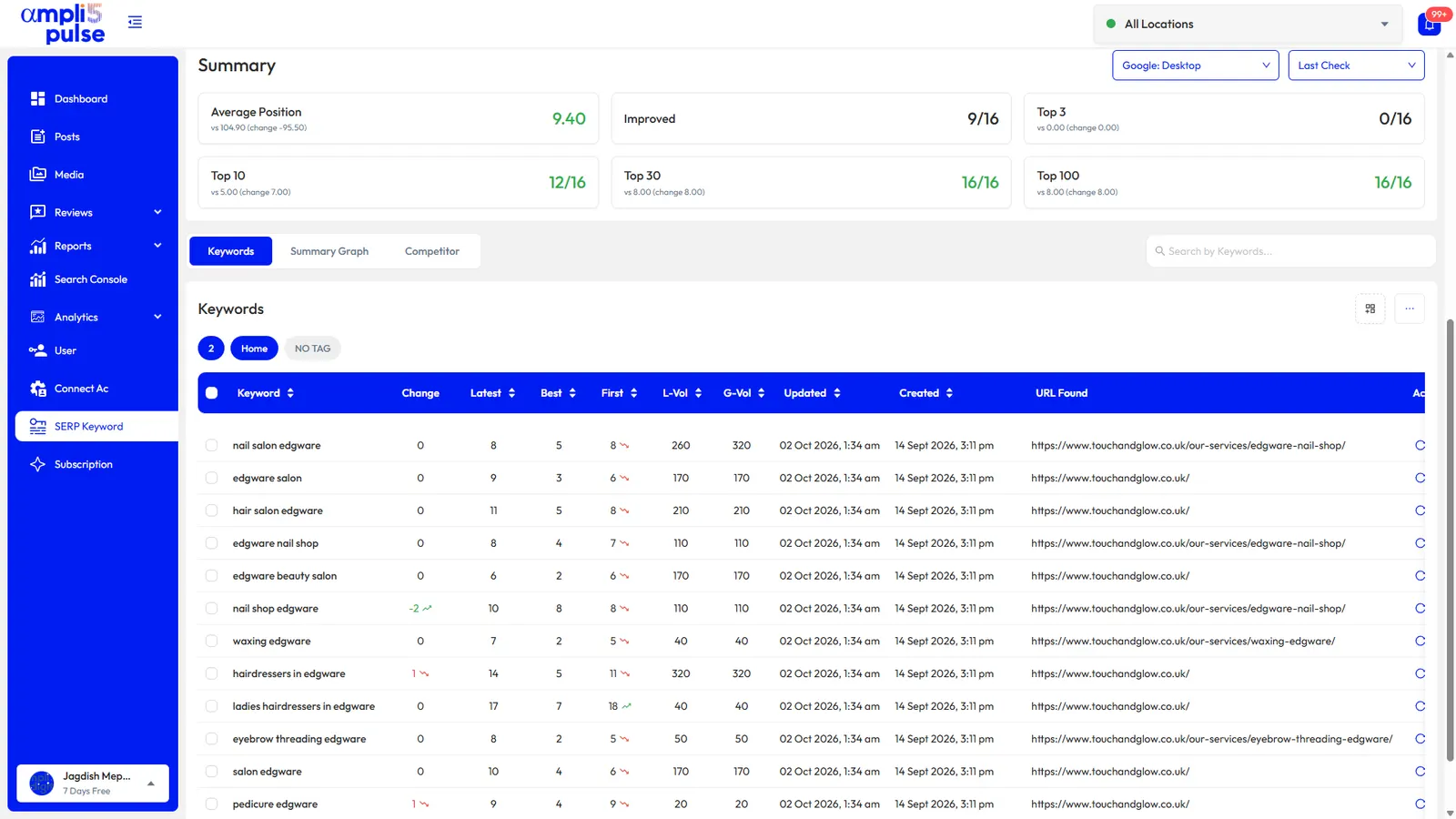
- Measure Maps positions from several points around your area, alongside calls, directions and website clicks.
How Google Maps ranking works
Start with the correct Google Account and a clear view of which business or location is involved. Platform interfaces can change,so use Google’s currentHelp instructions for sensitive account, policy or verification decisions.
| Factor | What Google means | What you can influence |
|---|---|---|
| Relevance | How well your profile matches what someone searched for | Categories, services, products, description, attributes, website content |
| Distance | How far your business is from the searcher, or the place in their search | Very little: your real address or service areas |
| Prominence | How well known your business is, online and off | Reviews and rating, links and mentions, local reputation, website strength |
Distance is mostly out of your hands, so Google Business Profile SEO is really about the other two. The good news is that most local competitors leave easy gaps in both.
Relevance: tell Google exactly what you do
Get the primary category right
Your primary category is the strongest relevance signal on the profile. Choose the most specific one that describes your main business: 'Dentist' rather than 'Health', 'Italian restaurant' rather than 'Restaurant'. You can add up to nine additional categories for other things you genuinely offer. Look at the categories the top-ranking competitors use for your main search terms; our guide to Google Business Profile categories shows how to find them.
Fill in everything that applies
- Services and products: list each one, with a short description and price where it makes sense.
- Business description: up to 750 characters, with no links. Describe what you do, who for and where, in natural language. See our guide to the Google Business Profile description.
- Attributes: tick the ones that apply, such as wheelchair access, outdoor seating or online appointments.
- Hours and holiday hours: keep them accurate, because searchers can filter for places that are open now, and wrong hours lead to wasted journeys.
- Website and booking links: point to the page for that location, not just your home page.
Keep keywords out of your business name
Your profile name must match your real-world business name, as it appears on your signage and paperwork. Adding 'Best Plumber Manchester' to it breaks Google's guidelines, can be reported by competitors, and can lead to suspension. Name changes can also trigger re-verification.
Distance: what you can and can't change
You'll naturally rank best close to your address, and less well the further away a searcher is. You can't change that, but you can make sure Google has the right information.
- Check your map pin sits exactly on your entrance, not the middle of the block.
- If you visit customers rather than receive them, set up as a service-area business: you can hide your address and list up to 20 service areas. Our guide to hiding your address on Google explains how.
- Listing service areas tells customers where you work; it doesn't make you rank across a whole region.
- Don't use a virtual office or mailbox address to appear in another town. Virtual offices aren't eligible unless staffed during business hours; see our guide to virtual addresses on Google Business Profile.
Prominence: reviews, links and reputation
Reviews
Google says more reviews and positive ratings can help your local ranking, and it recommends replying to reviews. What helps most is a steady flow of genuine recent reviews, not a burst followed by silence. Ask every customer, make it easy with a Google review QR code or link, and coordinate responses to customer feedback, good or bad. Never buy reviews or reward customers for them; that can get reviews removed and your profile restricted.
Links and mentions
Google says prominence also draws on what it knows about a business from across the web, including how many websites link to it. For a local business, the useful links are local ones: the local paper, your chamber of commerce, suppliers, community groups you sponsor, and well-known directories in your industry. Keep your name, address and phone number identical everywhere they appear.
Your website
Your website supports both relevance and prominence. Give each location its own page with its address, phone number, opening hours, services and a map, and link your profile to that page. Use clear page titles that say what you do and where. Our local SEO guide covers websites, citations and links in more depth.
A practical Google Maps SEO checklist
How to improve Google Maps ranking, step by step
Work through the checks in order, documenting significant changes when more than one colleague manages the profile.
Fix the foundations
Verify the profile, make sure a company account is the owner, and correct the name, address, phone number and map pin.
Choose the right categories
Set the most specific primary category, then add only the additional categories that genuinely apply.
Complete the profile
Add services, products, attributes, hours, a clear description and real, recent photos.
Build reviews and reply
Ask every customer for a review, make it easy with a link or QR code, and reply to each one, good or bad.
Strengthen local signals
Give each location its own web page, keep your details identical across directories and earn links from local sites.
Measure and repeat
Check Maps positions from several points around your area alongside calls, directions and clicks, then fix the next gap.
The checklist
Work through this list for each location. Most profiles have at least three or four gaps.
- The profile is verified and you have owner access on a company account, not a former employee's.
- The business name matches your signage, with no added keywords or locations.
- The most specific primary category is set, plus relevant additional categories.
- Address and map pin are exact, or service areas are set if you hide your address.
- Phone number and website link point to this location.
- Regular hours, holiday hours and special hours are up to date.
- Services and products are listed with short descriptions.
- The description uses all 750 characters well and contains no links or promotions.
- Relevant attributes are ticked.
- A square logo (720 × 720 px recommended), a cover photo and recent photos of the inside, outside, team and products are uploaded.
- A post has gone out in the last week or two.
- Every review from the last month has a reply.
- There's a simple system for asking every customer for a review.
- No duplicate listings exist for the same location.
- Your name, address and phone number match on your website and main directories.
Want this checked for you? Our Google Business Profile audit tool page explains what a full audit covers, and our Google Business Profile optimisation guide goes through each field in detail.
Do Google posts and photos help Google My Business SEO?
Google hasn't said that posts are a ranking factor, so be wary of anyone who claims posting daily will lift you up the map. Posts are still worth doing. They show searchers that the business is active, they put offers and events in front of people already looking at you, and they can turn a profile view into a call or a visit. Updates, Offers and Events can each carry a photo or video and a button. A rhythm of one good post a week is plenty for most businesses; see our guide to Google Business Profile posts.
Photos work the same way. Google encourages businesses to add them, and real, recent photos help people choose you. Upload JPG or PNG files between 10 KB and 5 MB, keep the logo square, and add new photos of your premises, team and products every month or so.
| Activity | Effect on ranking | Effect on customers |
|---|---|---|
| Replying to reviews | Recommended by Google; supports prominence | Shows you listen; builds trust |
| New genuine reviews | Review count and rating can help, says Google | Recent reviews are what people read first |
| Posts | Not confirmed as a ranking factor | Promotes offers and events, shows activity |
| Photos | Not confirmed as a direct factor | Helps people recognise and choose you |
| Accurate hours | Helps you appear for 'open now' searches | Avoids wasted journeys and bad reviews |
How to measure your Google Maps rankings
A single search from your desk tells you very little. Results change with the searcher's exact location, and being signed in can personalise them. To see your real local map ranking, check your position for each important search term from several points around your area, such as a grid across your town, and repeat it every week or two.
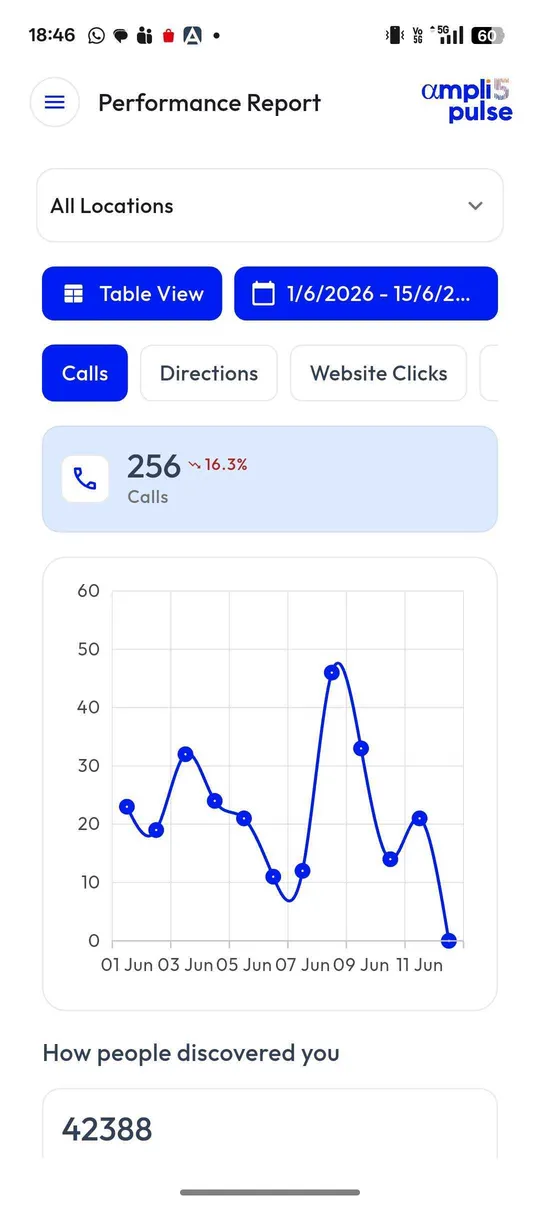
Rankings are only half the picture. In your Business Profile's performance figures, watch calls, direction requests, website clicks, bookings and the searches people used to find you. On your website, Google Search Console shows clicks, impressions and positions for your location pages. If rankings rise but calls don't, look at your photos, reviews and hours, which drive the click.
For more on tracking tools, see our guide to local rank trackers.
GMB SEO services: hire a company or do it yourself?
A single-location business with a couple of hours a month can do most Google My Business optimisation itself, using the checklist above. Paid help, such as GMB optimisation services, Google My Business SEO services or a Google Maps SEO company, earns its fee when the work is bigger or harder than that.
| Approach | Best for | Watch out for |
|---|---|---|
| Do it yourself | One or two locations, owners with a little time each week | Gaps that creep in when you get busy |
| Software | Many locations, in-house marketing teams and agencies | Someone still has to own the work |
| A GMB optimisation service | Verification, suspension or ownership problems, competitive categories, no time in-house | Guarantees, fake reviews, keyword-stuffed names, requests for your password |
What a good Google My Business SEO company does
- Audits categories, details, photos and reviews, and explains what it will change and why.
- Fixes verification, duplicate and ownership problems properly through Google.
- Asks to be added as a manager, never for your Google password.
- Reports on calls, directions and clicks as well as rankings.
- Never promises a guaranteed position, and never buys reviews or invents locations.
Ampli5 Pulse is the software, and the Ampli5 team also offers hands-on help: category and optimisation audits, profile setup, verification help, ownership disputes and Business Profile support with a four-hour response target. See Google Business Profile services for what's included, or talk to the team about your locations.