

Before
Profile left as it was set up
- Hours
- Old hours, no holiday hours
- Categories
- One generic category
- Photos
- None of the current outlet
- Services
- Not listed
- Phone
- Different from the outlet’s
 Franchise & Multi-Location Marketing
 Ampli5 Pulse software
 Google Maps management
 Local SEO + hyperlocal Google Ads


Pharmacy · Healthcare · Salons · Electronics · Jewellery · Grocery
Pick an industry and a location to see the keywords people use and their estimated average monthly searches, straight from Google Keyword Planner exports.
Google Keyword Planner | Oct 2025–Sep 2026
 Each card is one keyword in one location. Figures are never added together and are not customers, visits or Google Maps traffic.City figures are city-geotargeted monthly averages. India is a national average, not another city.“Near me” is part of the search phrase. These figures do not show demand within a 2–3 mile circle around an outlet.
An estimate prepared from Keyword Planner data. It is not a guaranteed audit, ranking or forecast of visits.
Google Maps optimisation
People use Google Maps to call, get directions and compare nearby options. An accurate, complete Business Profile for every outlet helps them choose yours. We optimise and manage each profile so the details stay right.
Before
After
Illustrative example

Name, address, phone, website and verification checked outlet by outlet.

The right primary and secondary categories for what each outlet offers.

Current storefront, interior and team photos, so visitors know what to expect.

Opening, special and holiday hours kept correct across the network.

Services and products listed accurately for each location.
 Google decides how profiles rank, based on relevance, distance and prominence. Optimisation does not guarantee rankings, calls or visits.

A page for each outlet answers what people ask before they visit, and tells search engines clearly which outlet serves which area.
Home › Locations › Ahmedabad › Prahladnagar
This outlet’s services, opening hours and ways to visit or contact the team.
 Call
Call Directions
 Website
Mon – SatHours
HolidaysSpecial hours
Illustrative example
A map and a clear address, so visitors know where the outlet is.Call and directions buttons that work on a phone.Local service detail written for this outlet, not copied from another city. Reviews from this outlet, where you have permission to show them.
 Local FAQs: parking, landmarks, accessibility and services.
 Local business schema built only from verified outlet facts.
 Tracking for calls, directions and form actions, outlet by outlet.
Use genuine photos of the outlet itself, not stock images.
How to capture: natural light, uniforms and signage visible, and consent before photographing staff or customers.
How to capture: a tidy, representative space from customer eye level, including entrances and key service areas.
How to capture: show the storefront, signage and approach so first-time visitors can find the entrance.
How to capture: only what is available at this outlet, with accurate colours and clear detail.
How to capture: photograph only facilities customers can use, with entrances and routes clearly visible.
Note: this is our practical recommendation, not an official Google requirement.
Hyperlocal Google Ads
We plan and manage Google Ads around each outlet, so people searching nearby can see the outlet closest to them and call, get directions or visit your website.
Someone nearby searches for what you offer, such as “pharmacy near me”.
Your ad can show on Google Search and, where eligible, on Google Maps.
Location assets and targeting point the searcher to the closest outlet that fits.

The customer takes an action, and we measure it per outlet.
 pharmacy near me
Sponsored · yourbrand.com
Your Brand Pharmacy – Prahladnagar
Open today. Call the outlet or get directions to your nearest branch.
Prahladnagar, Ahmedabad · Sample listing
CallDirectionsWebsite
Illustrative example
Keywords and budgets planned city by city, not as one national pool.
Area names and landmarks shape ad groups, copy and landing pages.
Each outlet’s Business Profile linked as a location asset, so ads can carry address, call and directions where eligible.
“Near me”, service and urgent searches grouped by intent, with copy for each.

Irrelevant searches blocked, so spend goes to relevant demand.

Calls, direction requests and website actions tracked for each outlet.
2–3 miles (3.2–4.8 km) is a proposed starting test for suitable outlets. It is not guaranteed delivery and it is not right for every outlet.Google Ads does not deliver to an exact circle, and you cannot run ads on Google Maps alone. Maps placements depend on campaign type and eligibility.We do not promise impressions, clicks, calls or visits.
Reviews across every outlet
Customers do not separate your outlets as neatly as your org chart does. Unanswered reviews and slipping ratings at one location can shape how people see the brand, so every outlet needs the same standard of attention.
| Outlet | Rating | Reviews | Unanswered | Responses | Status |
|---|---|---|---|---|---|
| Outlet A | 4.6 | 212 | 2 | 96% | Healthy |
| Outlet B | 4.4 | 148 | 5 | 88% | Healthy |
| Outlet C | 3.4 | 96 | 66 | 31% | Replies missing |
| Outlet D | 4.2 | 77 | 28 | 64% | Replies late |
| Outlet E | 3.9 | 131 | 55 | 58% | Repeated complaint |
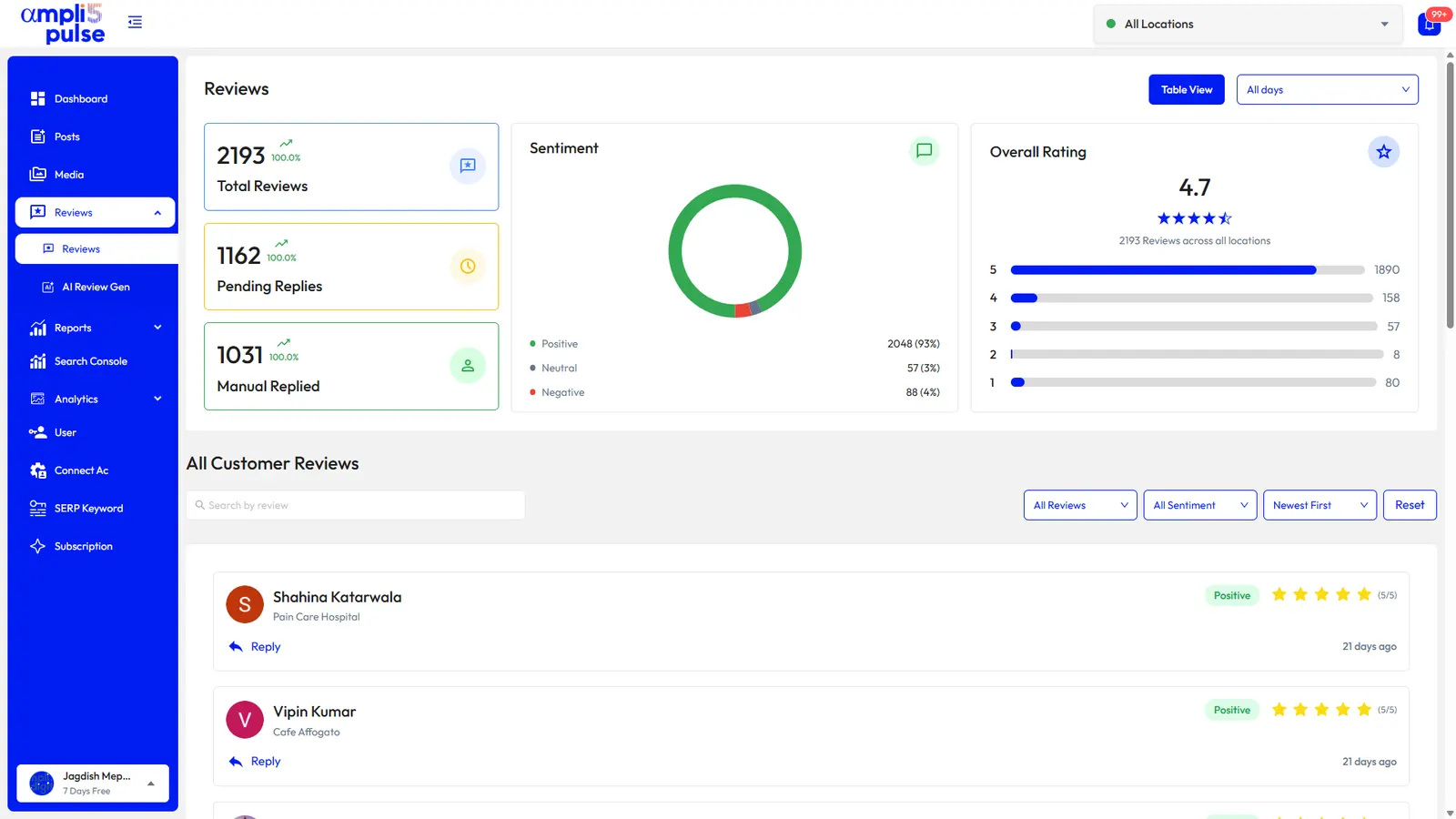
A brand-trust risk, not a ranking claim. Poor reviews at one outlet can change how customers see the brand. We do not claim that one outlet’s reviews lower another outlet’s Google Maps ranking.
We confirm your locations, profile access, report scope and turnaround before we start.
 Posts, offers and events
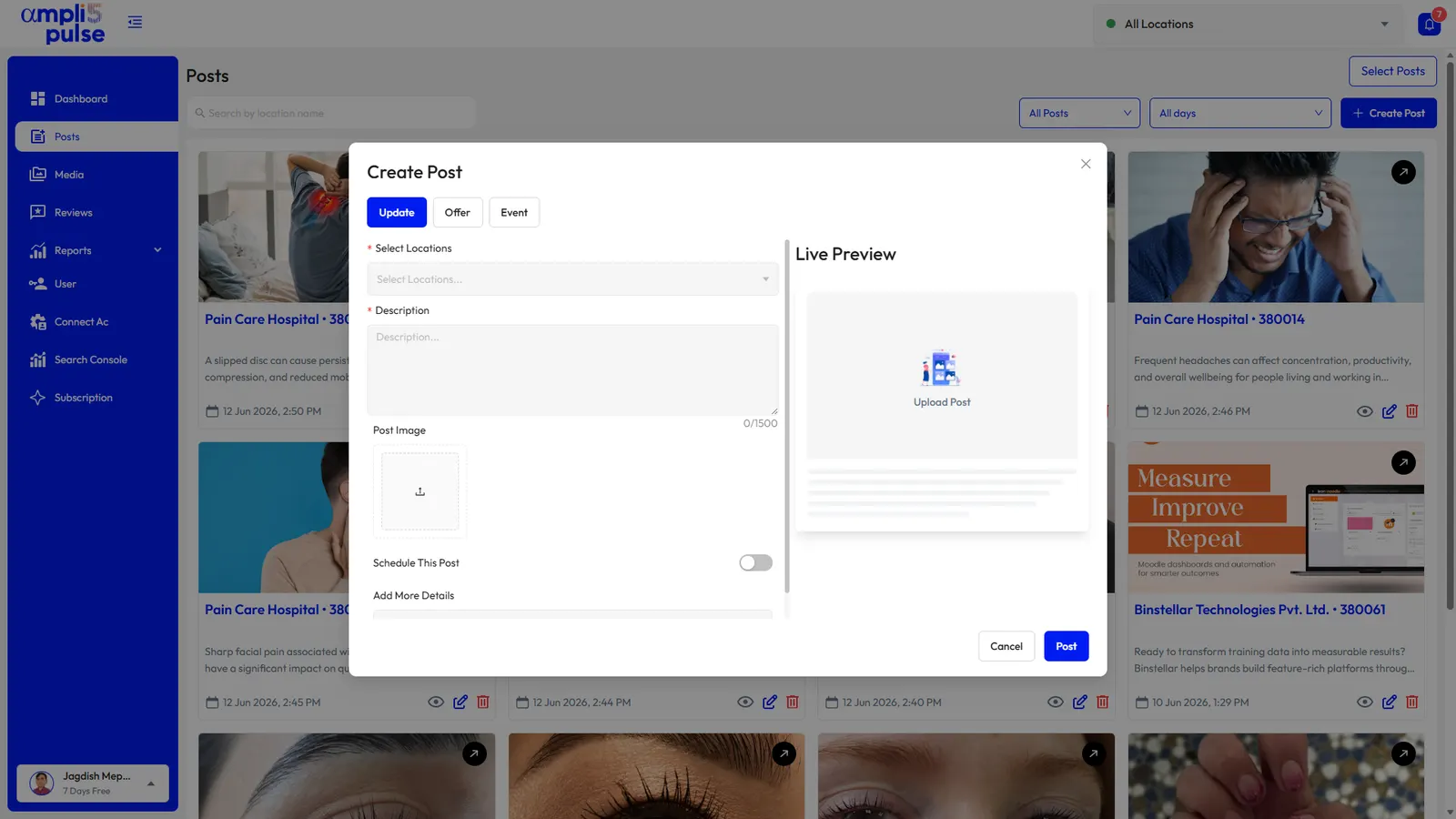
Google Business Profile posts keep every outlet current. With Ampli5 Pulse you write a post once, choose the outlets it should reach and publish or schedule it.
Write an update, offer or event with a live preview.
Choose all locations or only the eligible ones.
Post now, or set the date and time.
Check the post on each location in the Posts list.
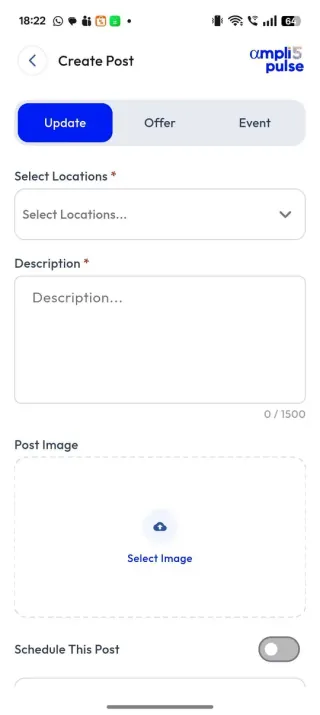
News, new arrivals or a notice for customers.
A time-bound promotion customers can find on the profile.
A launch, a sale day or a workshop, with start and end dates.
 Approved content, so every outlet shares the same brand message.Outlet-specific relevance: pick the locations where the post applies.Exclusions: leave out outlets that do not honour an offer.
Google Business Profile posts
Approved content, so every outlet shares the same brand message.Outlet-specific relevance: pick the locations where the post applies.Exclusions: leave out outlets that do not honour an offer.
Google Business Profile posts
Reporting on desktop and mobile
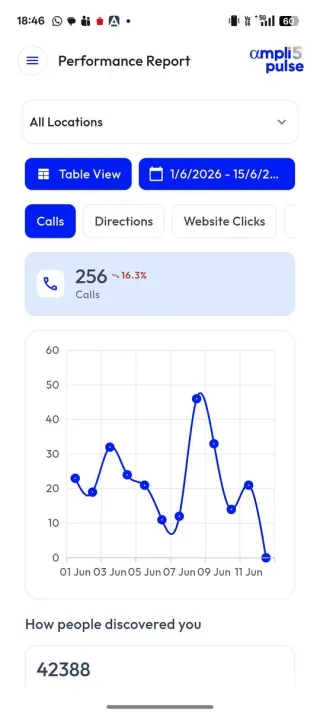
See how each outlet and the whole network are performing, on the web and in the iOS and Android apps.
Today, for many networks
With Ampli5 Pulse
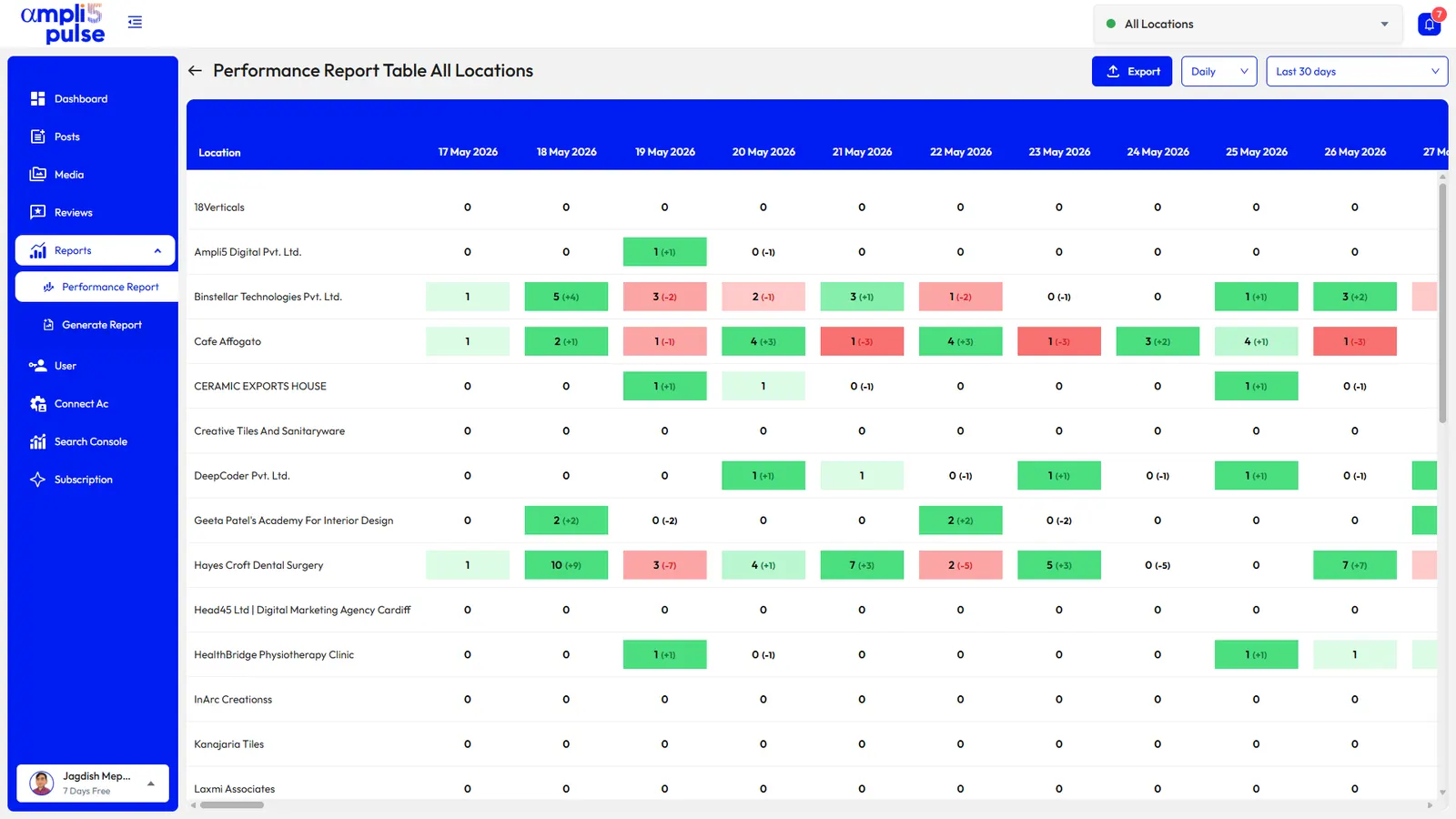
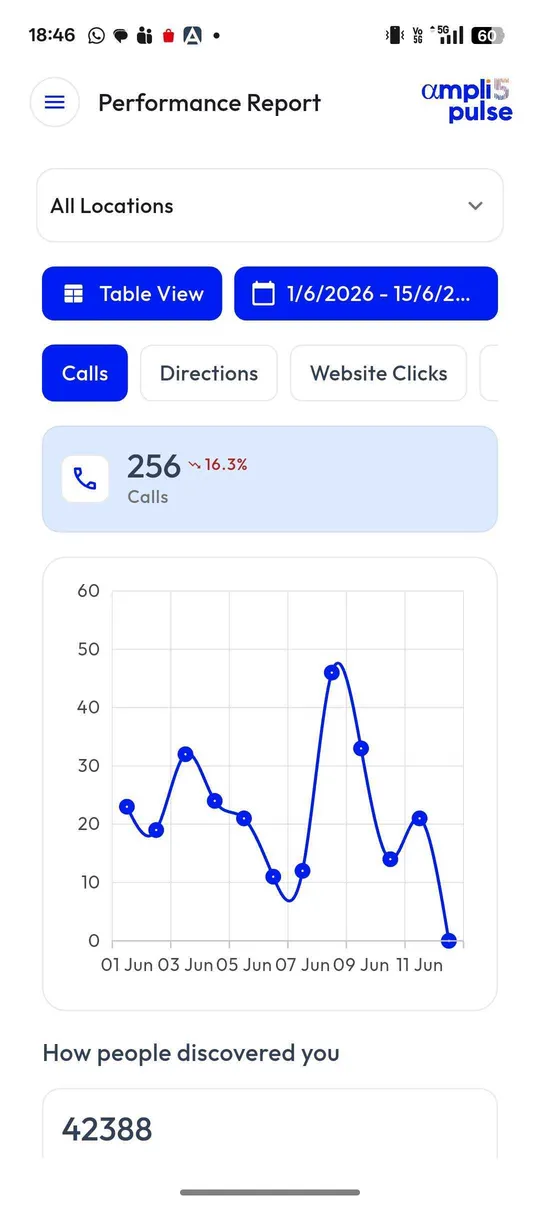
 CallsDirection requestsWebsite clicksPeriod comparisons
 Export
Reports show the latest available data from Google, not instant real-time numbers.
Pick the support that matches your team, or combine services as your network grows.
Self-managed
Your team runs every outlet’s Google Business Profile, posts, reviews and reports from one workspace, on web, iOS and Android.
Best for: networks with a marketing or operations team that wants the tools and the control.
Enquire About Ampli5 Pulse See the features
Managed by us
We optimise each outlet’s profile, handle review replies and publish posts, offers and updates for you.
Best for: brands that want profiles looked after without adding work for local teams.
Enquire About Managed GBP How GBP management works
Complete service
Outlet pages, local SEO and Google Ads management, powered by Ampli5 Pulse where it helps.
Best for: brands ready to grow calls, direction requests and visits beyond profile management.
Enquire About Local SEO + Ads How local SEO works
These services can be combined. Tell us what you need and we will recommend a starting point.
A pilot across roughly 30% of a suitable network is a proposed starting framework. We shape the final scope and budget with you.
An illustrative starting point, rounded up to a whole outlet. Final scope and budget are agreed with you.
 A balance of high-, medium- and low-performing outletsMore than one market, so results are not tied to a single cityDifferent outlet types and competitive conditions
Share your brand, industry, number of locations and target cities, and choose the services you are interested in. We will come back with sensible next steps.
 One form for every request: a strategy discussion, a demand report, a Maps audit, a review health report or a pilot plan.Reports and audits are estimates from the data available. They are not guaranteed audits, rankings or visits.
Our team will be in touch about your brand.
We’ve sent a copy to your email.