Practical Google Business Profile Guide

Interpreting a Local Rank Tracker

  • Google Search and Maps local pack positions
  • AI Overview visibility
  • Rank history and competitor comparison

Trial terms on request · Subject to availability · Web, iOS & Android

  • 3Ranking views: Search, Maps, AI
  • 1,200+Locations
  • 150+Agencies
  • 150,000+Reviews managed

What you can do with Ampli5 Pulse.

A local rank tracker records search positions under a defined set of conditions; it does not measure every searcher’s experience.

  • Google Search positions

    Track organic positions for each location's keywords, with the latest position, the best so far and the change since the last check.

  • Maps local pack positions

    See where each location appears in the Google Maps local pack for the searches that bring in calls and visits.

  • AI Overview visibility

    Follow your visibility in Google's AI Overviews for the keywords you track, alongside your normal positions.

  • Rank history

    Rank history shows every move up or down over time, so you judge trends rather than single days.

  • Competitor comparison

    Add competitors and compare their positions with yours, keyword by keyword, in a table or on a graph.

  • Desktop and mobile

    Check desktop and mobile results separately, because what people see on each can differ.

How it works.

  1. 1

    Create a project

    Choose a manageable list of commercial and informational queries that reflect actual services.

  2. 2

    Add your keywords

    Record the observation point, device, search surface and frequency where the provider supports those dimensions.

  3. 3

    Choose what to track

    Separate Search listings, Maps results and AI answer appearances unless each source is confirmed.

  4. 4

    Read the results

    Compare like with like, annotate business changes and review a trend instead of reacting to a single position.

app.ampli5pulse.com
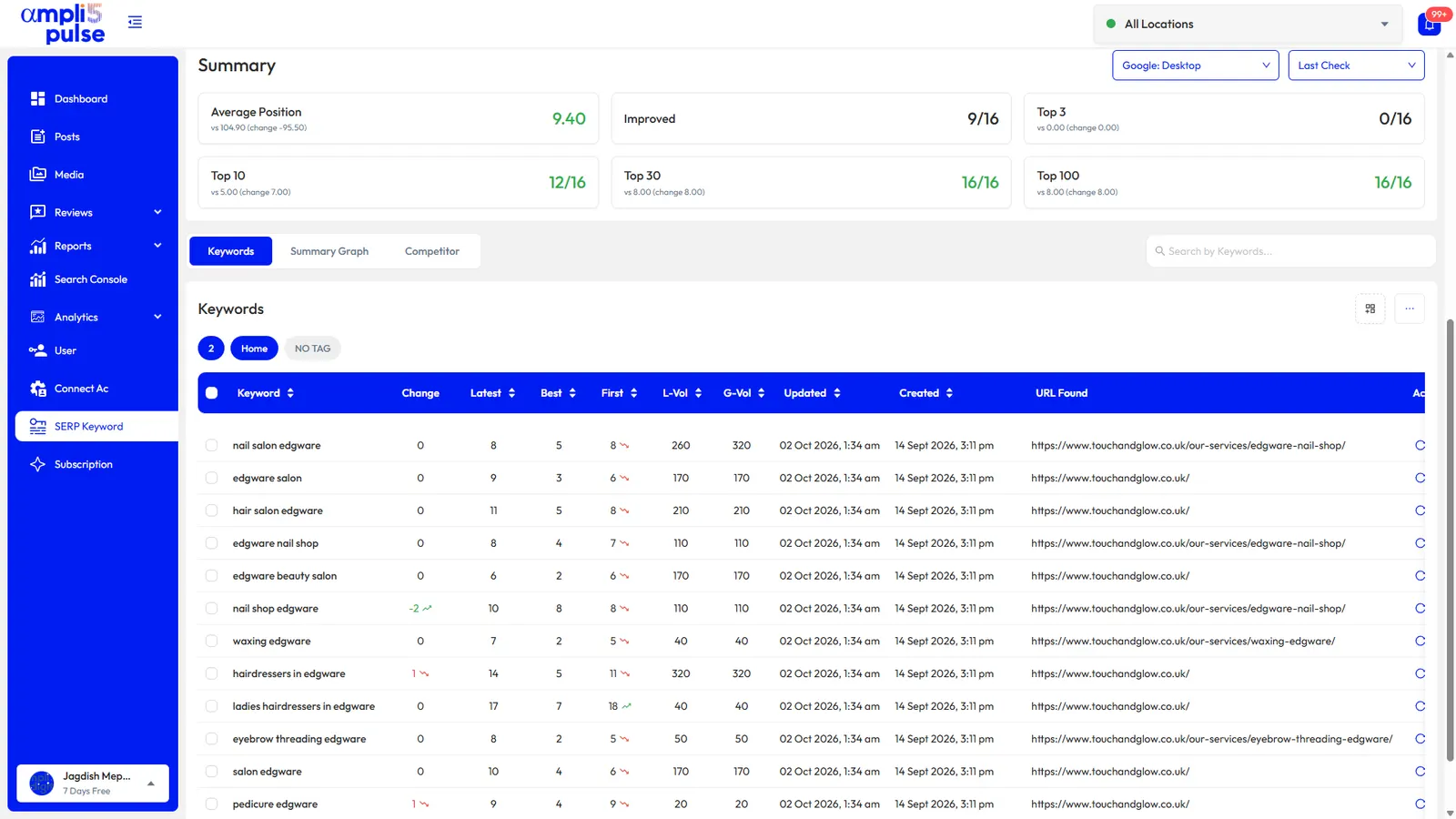
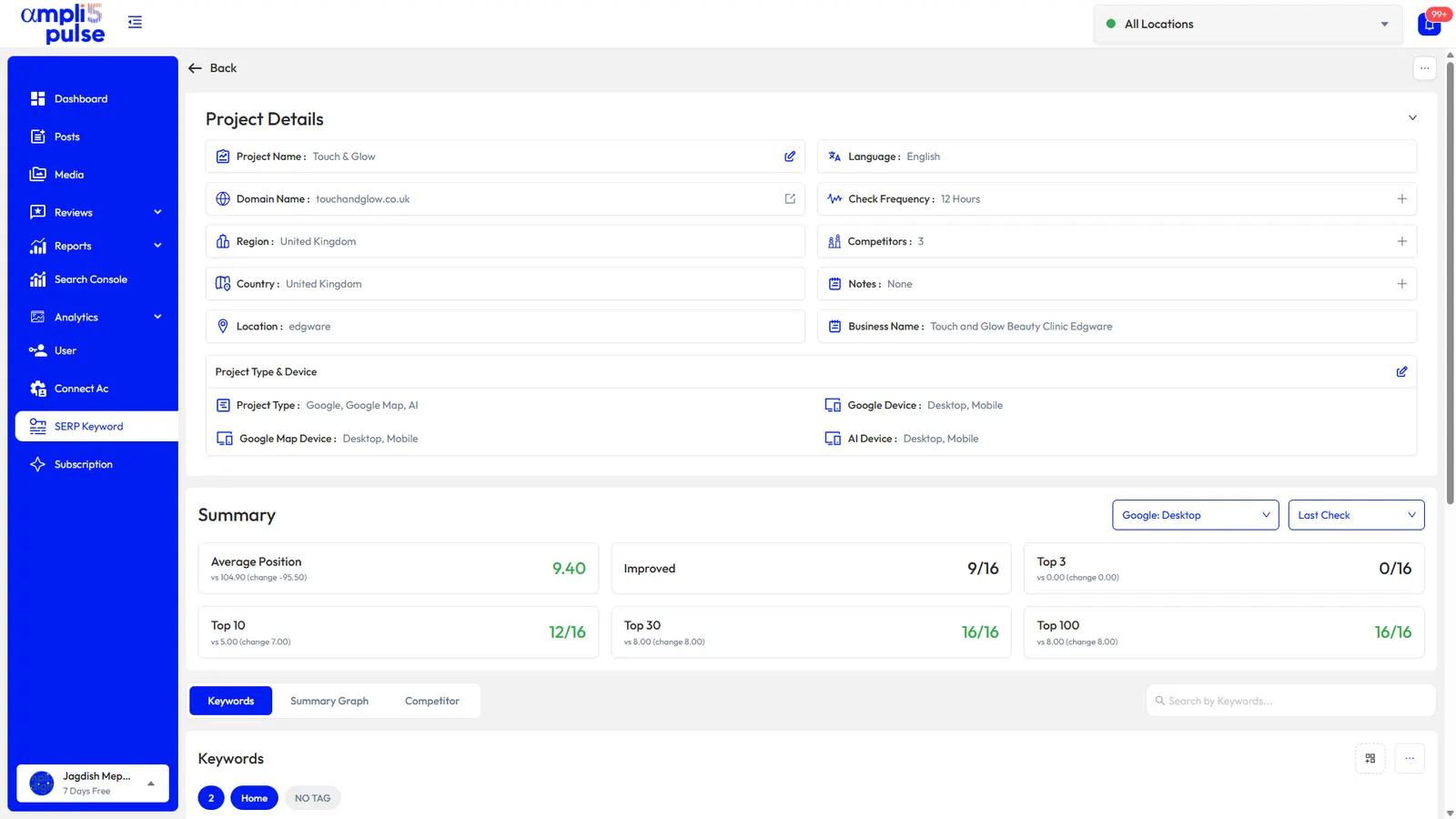
A rank tracking project in Ampli5 Pulse with average position and keywords in the top 10

Summary

Your local rankings at a glance

Each project shows your average position, how many keywords improved, and how many sit in the top 3, top 10, top 30 and top 100, with the change since the previous check.

  • Average position
  • Keywords improved
  • Top 3, 10, 30 and 100 counts
app.ampli5pulse.com
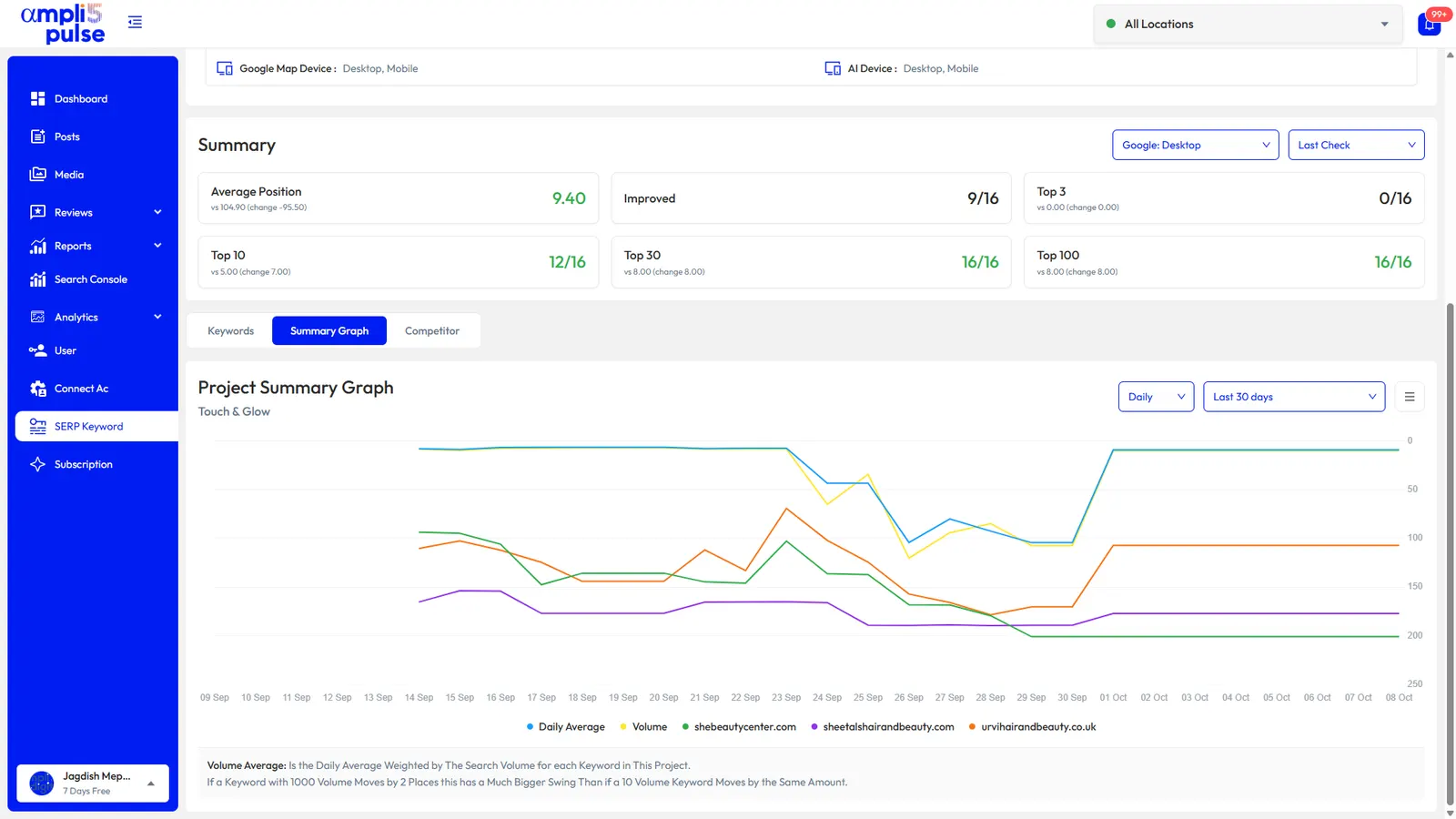
Average ranking position over time, compared with competitors, in Ampli5 Pulse

History

See the trend, not just today's number

The summary graph plots your daily average position over the period you choose, with competitors on the same chart. A volume-weighted line gives busier keywords more weight, so one important move isn't hidden by several small ones.

  • Daily average position
  • Volume-weighted average
  • Competitors on the same chart
app.ampli5pulse.com
Keyword positions compared with competitors in Ampli5 Pulse

Competitors

Compare positions with local rivals

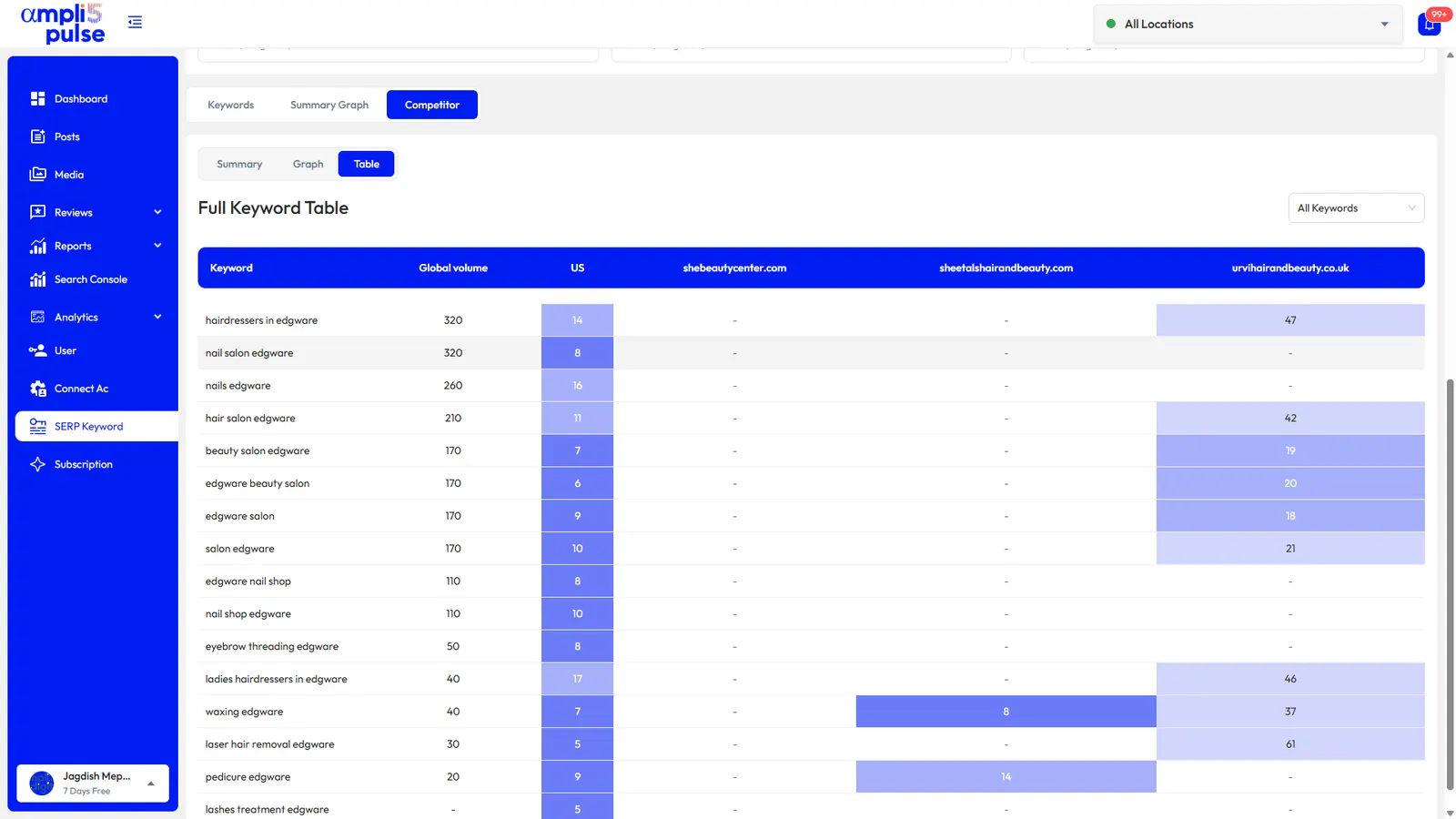
A full keyword table puts your position next to each competitor's for every keyword, so you can see where you lead and where they do.

  • Keyword-by-keyword table
  • Summary and graph views
  • Search volume beside each keyword

Checking by hand vs a local rank tracker

Manual Google searchesLocal rank tracker
LocationShows results for wherever you areChecks the location you choose
PersonalisationAffected by your search history and deviceNot tied to your own browsing
Maps local packHard to record accuratelyPosition recorded for each keyword
HistoryOnly what you write downRank history over time
CompetitorsOne search at a timeSide-by-side comparison
TimeMinutes per keyword, every timeChecks run automatically

The guide

Performance Insights, explained.

In short

  • A local rank tracker checks your keywords consistently, for a set location, on a schedule, giving you numbers you can compare week to week.
  • Track both the local pack and organic results, because the pack leans on your Business Profile, reviews and distance, and organic results more on your website.
  • Keep the location, device and keyword list the same between checks, and judge trends over several weeks rather than small daily changes.

Why you need a local rank tracker

Start with the correct Google Account and a clear view of which business or location is involved. Platform interfaces can change, so use Google’s current Help instructions for sensitive account, policy or verification decisions.

A local search rank tracker solves this by checking your keywords consistently, for a set location, on a schedule. That gives you numbers you can compare week to week instead of guesses. An online local rank tracker also saves the time of searching each keyword by hand and writing the results down.

Maps local pack vs organic results

Most local searches show two kinds of result. The local pack is the map with a short list of businesses, usually three, drawn from Google Business Profiles. Below it are the organic results, the familiar list of web pages. You can rank well in one and poorly in the other, because the local pack leans on your Business Profile, reviews and distance, while organic results lean more on your website. A good Google local rank tracker follows both.

Where AI Overviews fit

On some searches Google shows an AI Overview above the results: a generated summary with links to its sources. Being mentioned or linked there is another kind of visibility, so it's worth tracking alongside your normal positions.

What to track with a local SEO rank tracker

Work through the checks in order, documenting significant changes when more than one colleague manages the profile.

  • Service plus place: 'hair salon Edgware', 'emergency plumber Leeds', 'dentist in Koramangala'.
  • Near me searches: 'nail salon near me'. These depend entirely on where the searcher is, so expect them to move around more.
  • Your main services: one keyword for each service you want more of, not only your headline service.
  • Category terms: words that match your Google Business Profile categories.
  • Branded searches: your business name, to check your profile appears when people look for you.
  • Each location separately: a branch in one area competes with different businesses from a branch in another, so give each its own keyword list.
Reading local ranking positions
PositionWhat it usually meansWhat to do
1 to 3 in the local packYou're in the map results most people see firstProtect it: keep reviews coming and the profile active
4 to 10 in MapsVisible to people who open the full list of placesCheck categories, reviews and how complete your profile is
Top 10 organicOn the first page of web resultsImprove the page that ranks and link it from your profile
Outside the top 30Rarely seenCheck the keyword fits what you offer and that a page targets it

How to read your rank history

Rankings move. Small daily changes are normal and usually mean nothing on their own. Look for trends over several weeks, and line them up with what you changed. This is where local SEO rank tracking software earns its keep.

  1. Compare like with like

    Look at the same device, the same results type (Search or Maps) and the same location each time.

  2. Watch averages and bands

    Average position and the number of keywords in the top 3 and top 10 are steadier than any single keyword.

  3. Note your changes

    Write down when you changed categories, added photos, ran a review drive or updated a page, then check the weeks that followed.

  4. Check competitors

    If everyone dropped on the same day, a Google change is the likely cause. If only you dropped, look at your own profile and website.

  5. Connect rankings to results

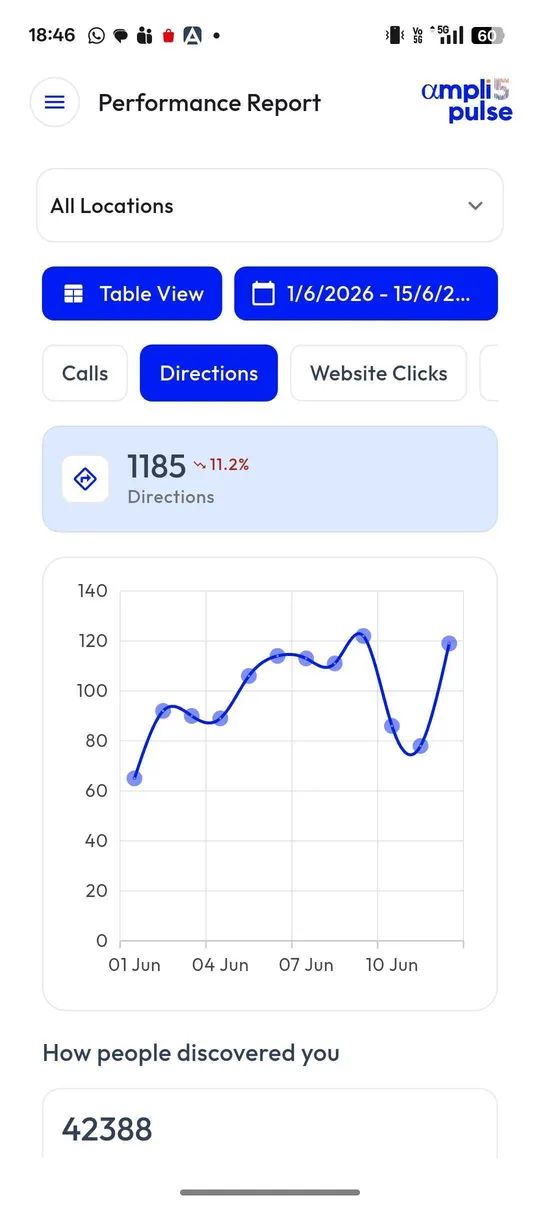
    Check calls, direction requests and website clicks for the same period. A higher position matters most when more customers act on it.

If a location vanishes from Maps altogether rather than slipping a few places, check whether the profile has been suspended. Our guide to a suspended Google Business Profile explains what to look for.

How to improve what your rank tracker shows

A rank tracker for local SEO tells you where you stand. These are the levers you control.

  • Choose the right primary category and relevant additional ones. See our guide to Google Business Profile categories.
  • Complete every profile field: hours, services, description, photos and attributes.
  • Earn reviews steadily and reply to them. A Google review QR code at the counter makes asking easy.
  • Post regularly with updates, offers and events.
  • Build a page on your website for each location and link it from that location's profile.
  • Keep your name, address and phone number consistent across your website and directories.
Questions, answered.

Straight answers to the questions people ask most about this.

Still stuck?

Our team works with Google Business Profiles every day. Tell us what is happening and we will point you the right way.

Talk to our team

Not necessarily. Google may review updates or request verification, and display timing can vary.

No specific position is guaranteed. Google describes relevance, distance and prominence as key considerations in local search.

GMB stands for Google My Business, the old name for Google Business Profile. A GMB rank tracker is a local rank tracker that follows your profile's position in Google Maps and the local pack. Our guide to Google My Business SEO covers what affects that position.

Your results depend on where you are, your device and your search history. Search from your own premises and you're right next to the business, so you'll often rank higher than you do for customers across town. A rank tracker checks for a fixed location without your personal history.

Let the tracker check automatically and review the results weekly. Monthly is usually enough for reporting. Reacting to daily swings tends to lead to changes that don't help.

The best one covers the Maps local pack as well as organic results, lets you set the location for each branch, keeps history, compares competitors and suits your number of locations and budget. If you also manage profiles and reviews, keeping rankings beside that data saves switching between tools. Compare options on a free trial with your own keywords; our local SEO tools guide covers what else to look for.

Common causes are new competition, a Google update, a category or address change, or a suspended profile. Check whether competitors moved too, look at recent edits, and read why a business isn't showing on Google.

Ready to try it on your own locations?

Explore the platform, or Request a Demo and we’ll walk you through Ampli5 Pulse with your own profiles.